AI Models
3 min
The AI Models page allows you to connect and manage Generative AI model integrations within the Analytics platform. This feature enables engineering teams to use their preferred Large Language Models (LLMs) without compromising on ease of use.
Before You Begin
Ensure that you meet the following requirements:
- Valid API keys and tokens for the selected AI model provider to authenticate a stable connection.
- Appropriate permissions to access and modify AI model configurations within the Analytics platform.
Important: While multiple providers are available (OpenAI, Cloudflare AI Gateway, OpenAI Assistants , Grok 3 , Ollama, Google Gemini, Nvidia, and Anthropic), only specific options may be supported with this release.
Access AI Models UI
To access AI Models:
- Log in to Litmus Edge.
- From the Navigation panel, navigate to Analytics > Models.
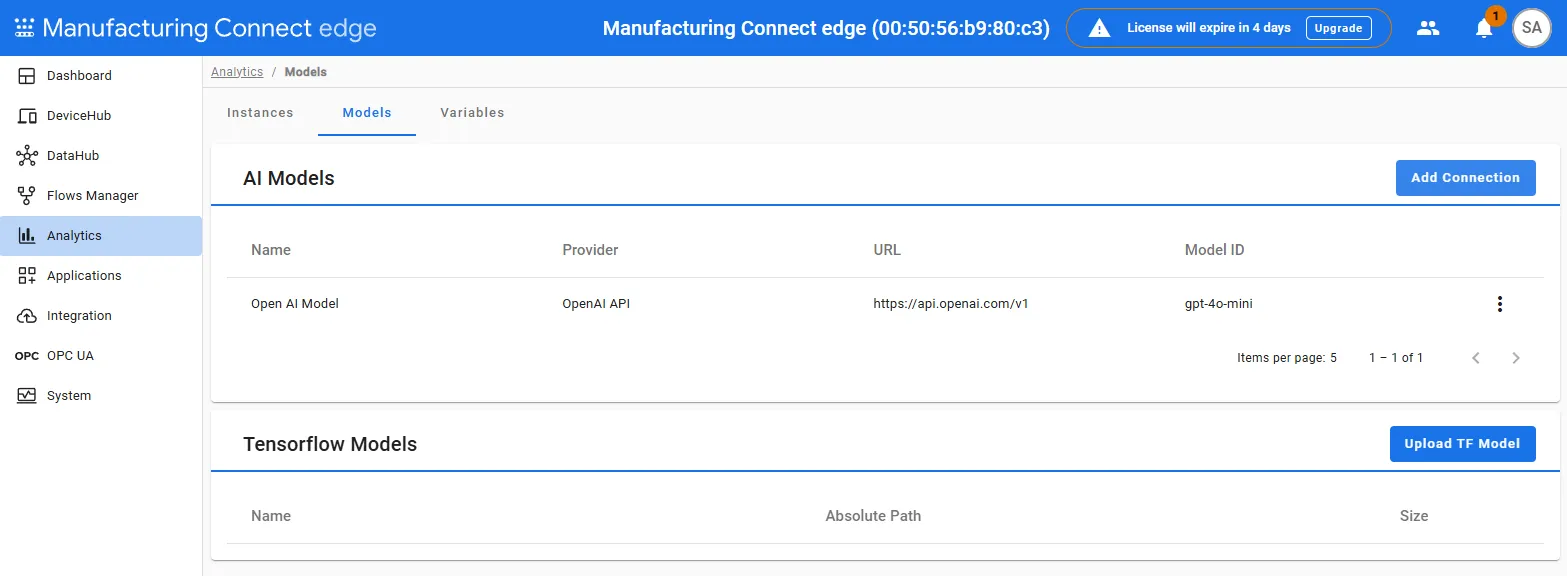
AI models display here and including the:
- Provider The organization or service that offers the AI model, such as OpenAI or Google Gemini.
- URL Web address used to access the AI model's endpoint for integration.
- Model ID A unique identifier for the AI model which distinguishes it from other models in the system.
Next Steps
After accessing the AI Model's page, see the following next steps: