AI Vision Processor
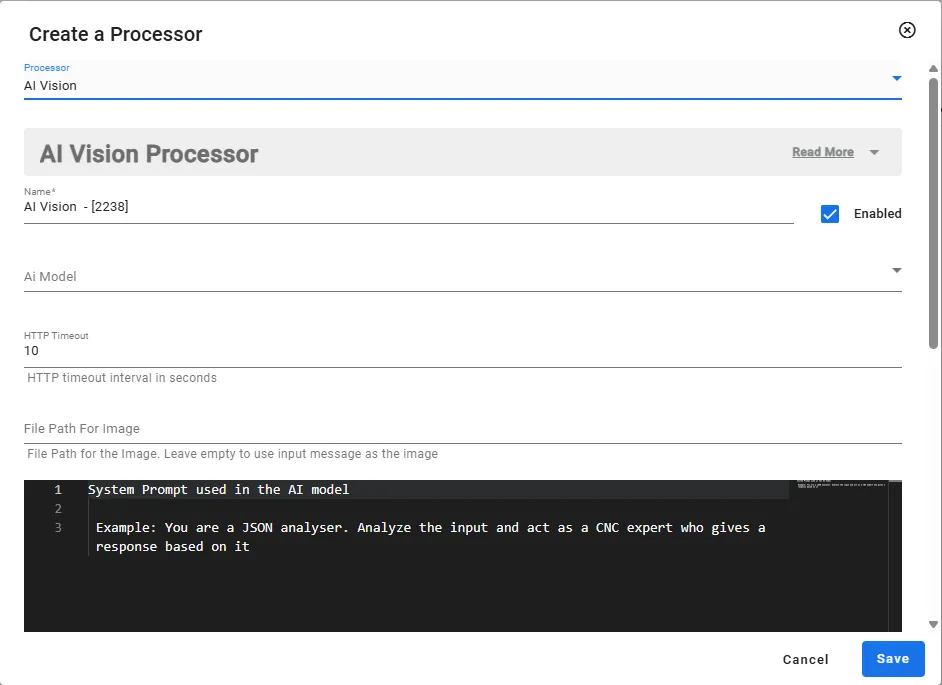
The AI Vision Processor allows you to use the image processing capabilities of advanced AI models. By allowing users to customize parameters such as file paths, response randomness, and timeout settings, it integrates efficient performance in complex work situations.
AI Vision Processor Overview
You can set the following:
- File Path can be provided, or model can expect a base64 image from the input payload
- File path will always supersede incoming payload
- The model accepts jpg, png, and gif file types
- AI Model defines the unique name identifier for the model being used.
- System Prompt parameter allows users to provide a predefined instruction that influences the AI’s behavior and response style.
- This can be used to enforce a specific tone, persona, or domain expertise in responses.
- Temperature parameter (default 1.0) controls the randomness of responses.
- Lower values (for example, 0.2) make the AI more focused and deterministic.
- Higher values (for example, 1.8) increase creativity but may reduce consistency.
- Max Completion Tokens parameter limits the maximum number of tokens the AI can generate in a single response.
- This ensures output length remains within expected boundaries.
- If not set, the model’s default value applies.
- HTTP Timeout parameter sets the maximum time (in seconds) the system will wait for a response from the AI.
- If the AI does not respond within this time, the request timeouts and is ignored. This prevents excessive delays in cases of high latency.
AI Vision Processor Parameters
Parameters | Details |
|---|---|
Name | The unique identifier assigned to differentiate each customized AI model. |
Ai Model | Specifies the actual AI model being utilized for generating responses. |
HTTP Timeout | Sets the maximum wait time (in seconds) for obtaining a response from the AI before it times out. |
File Path For Image | Indicates the location of an image file that can be accessed or processed by the AI. |
Code Editor | A tool or interface for writing and editing code, possibly for integration or customization involving the AI. |
Temperature | Controls the randomness of the AI’s responses, with lower values yielding more deterministic outputs and higher values fostering creativity. |
Max Completion Tokens | Limits the maximum number of tokens that the AI can generate in a single response. |
Time Interval | Defines a specific duration or frequency at which certain operations or requests should occur. |