Digital Twins
Digital Twins is a Manufacturing Connect Edge feature that lets you create virtual representations of assets (machines, devices, or production lines) and combine static metadata with real-time data from your shop floor into a single, structured payload. Use Digital Twins to monitor asset performance, feed contextualized data to northbound systems, and optimize operations without relying on those systems to understand how raw data is structured.
Note: Digital Twins requires a Scale or Growth license.
How Digital Twins works
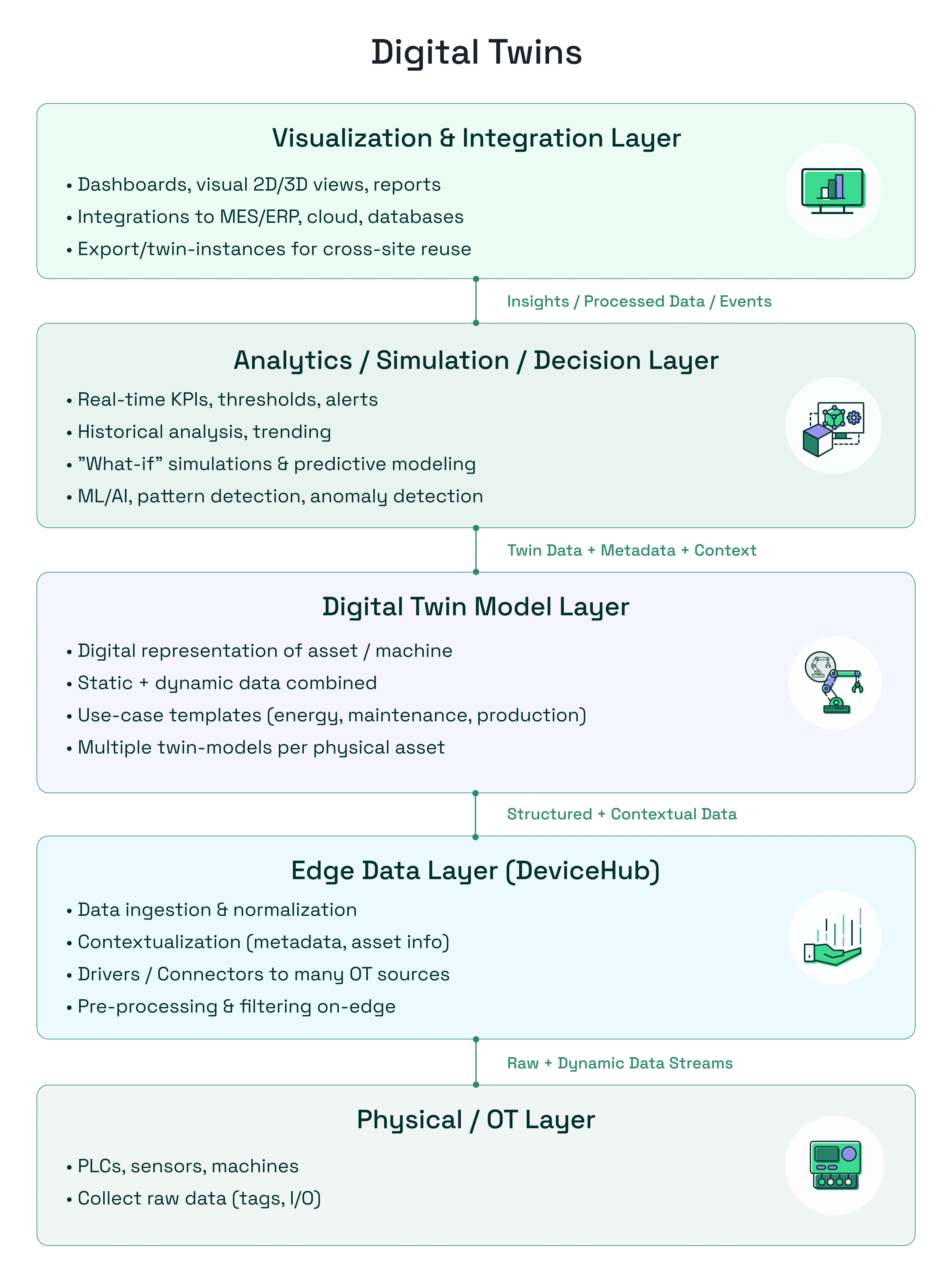
Digital Twins occupies the middle of a five-layer stack. PLCs, sensors, and machines at the bottom layer generate tag and I/O data. Manufacturing Connect Edge collects, normalizes, preprocesses, and filters the data at the edge. It also enriches the data with metadata and asset information before passing the structured data to higher layers for processing and analysis.
Digital Twins is part of Manufacturing Connect Edge and combines that structured data with static metadata to produce a complete digital representation of each physical asset.
The assembled twin data (including metadata and context) feeds the layers above. Analytics systems use it for real-time KPIs, thresholds, historical trending, what-if simulations, and ML/AI pattern detection. Visualization and integration systems use it for dashboards, MES/ERP connections, cloud exports, and cross-site reuse.
Within Manufacturing Connect Edge, Digital Twins uses a two-level hierarchy: models and instances.
A model is a template. It defines the structure of a digital twin: the static attributes (metadata such as manufacturer, plant, and area) and dynamic attributes (real-time data fields such as temperature, current, or pressure). Models also hold transformation schemas and topic expression parameters that apply to all instances built from that model. A physical asset can have more than one model applied to it. For example, the same machine might have a model for energy monitoring, a separate model for maintenance tracking, and another for production output. Each model produces its own set of instances and topic-based data streams.
An instance is a specific asset. It inherits its structure from a model and lets you fill in the actual values: the real device name, the specific NATS topics that feed live data into each dynamic attribute, and any parameter overrides. You can create many instances from a single model, for example, one model for a CNC machine type and one instance per physical machine on the floor. When an instance runs, Manufacturing Connect Edge assembles a structured JSON payload combining static metadata and live tag data, then publishes it on a NATS topic at the interval you configure.
Models
You configure the following in a model:
- Static attributes: fixed metadata fields such as Device ID, Serial, and Model. You define them as placeholders in the model and set the real values in each instance.
- Dynamic attributes: Variable data fields such as Temperature, Vibration, and Downtime. Each dynamic attribute is mapped to a live data topic in an instance.
- Transformations: Rules that convert raw JSON data into the required format before it enters the payload. Use JSON transformations to filter key-value pairs or JSONata to apply conditional logic and generate computed outputs.
- Parameters: Named variables that you define in a model and set by instance. They allow a single topic expression to resolve to a different topic for each instance. This saves time when a model has many dynamic attributes and many instances.
- Schema: A custom data structure that groups static and dynamic attributes into a named hierarchy for downstream systems that expect a specific JSON structure.
Instances
Every instance is associated with a model. The model's attribute configuration determines the data the instance collects. Each instance generates a NATS topic and publishes its assembled payload to the internal message broker at the interval you configure.
When you configure an instance, you can:
- Set real values for static attributes
- Map live data topics to dynamic attributes
- Set parameter values for the instance
- View real-time data in the Data Access tab
- Publish attributes on individual topics
- Publish flattened payloads for tabular databases
Workflow
When you set up a model, follow the data flow because each phase depends on the one previous one. For example, a dynamic attribute can only reference an existing transformation schema, and a topic expression can resolve only a previously defined parameter.
To set up a model:
- Configure static attributes for metadata such as manufacturer, plant, and area.
- Transform and map data by defining transformation rules, parameters for topic expressions, and dynamic attributes that reference those parameters.
- Define the output schema to provide downstream systems with the expected JSON structure.
An instance applies that structure to one physical asset. It inherits the model's attributes and replaces placeholder values with real ones. When you set up an instance, you:
- Choose the model to inherit from and interval for publishing to the message broker.
- Enter the asset's real static attribute values in place of the model's placeholders.
- Map each dynamic attribute to the topic that feeds it, or set the parameter values that resolve its topic expression.
- Check the result in the Data Access tab, which shows the assembled JSON payload.
After you set up an instance, start or stop it as needed. If you update the model, manually upgrade the instance to apply the changes.
Access Digital Twins UI
To access Digital Twins:
- Log in to Manufacturing Connect Edge.
- In the navigation panel, select Digital Twins. The Models pane appears.