ZeroTouch
4 min
Zerotouch provisioning allows you to automatically install Edge instance configurations, applications, and Docker files onto multiple devices.
The Zerotouch tab allows you to:
- Set up a static IP with subnet mask, gateway, and DNS settings.
- Add Docker containers to the Zerotouch TAR.
- Display an MD5 checksum to verify the file.
- Create and download Zerotouch TAR files.
- Log actions like file creation and timestamps.
Important Notes:
- Large files may take longer to generate.
- FAT32 USB drives don’t support files over 4GB—use NTFS or EXT4 instead.
- Once created, Zerotouch configurations cannot be edited.
- Zerotouch files are not included in backups but remain available after system updates.
Access Zerotouch UI
To access the Zerotouch UI:
- Log in to Manufacturing Connect. The Status Overview pane by default appears.
- From the Navigation panel, select Edge Management. Edge Management pane appears, by default the Edge Devices tab displays.
- From Edge Management pane, select Zerotouch. Zerotouch tab appears.
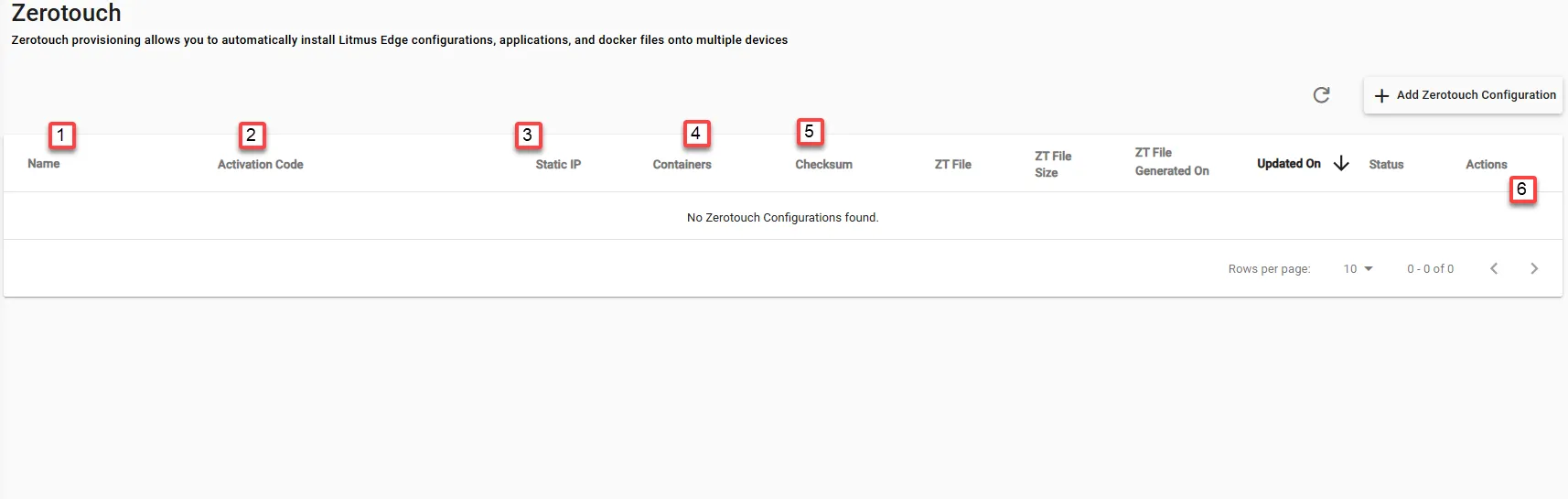
Refer to the following actions you can take on the Manufacturing Connect User UI's Zerotouch tab.
Action | Details |
|---|---|
[1] Name | Custom label for the configuration. |
[2] Activation Code | The activation code (if used). |
[3] Static IP | Shows if a static IP is set (Yes/No).
|
[4] Containers | Number of Docker containers included.
|
[5] Checksum | MD5 checksum of the generated TAR file (if available). |
[6] Actions | Buttons to Edit, Generate, or Remove a configuration. |