Mitsubishi iQ-F Ethernet
Review the following information for setting up and configuring the Mitsubishi iQ-F Ethernet driver.
Manufacturing Connect Edge Compatible Series
Compatibility parameter | Compatible items |
|---|---|
Driver type | Ethernet |
Validated devices/series | |
Replaces Gen 1 driver(s) |
To set up and configure this device in Manufacturing Connect Edge, you will need to do the following:
- Step 1: Set up and Configure the PLC Device
- Step 2: Set up the PLC Device in Manufacturing Connect Edge DeviceHub
- Step 3: Configure the List of Registers
Step 1: Set up and Configure the PLC Device
Note: Only one connection is allowed per port defined in the PLC. See the steps below to view and edit the open ports on the PLC.
If the device is configured for Ethernet access, find its network parameters. Otherwise, use PLC software on your computer to configure the device for Ethernet access.
- Open the PLC project in GXWorks 3.
From the Navigation panel, click Ethernet Port to view the communication parameters. Note down the IP Address, Subnet Mask, Default Gateway, and Communication Data Code.
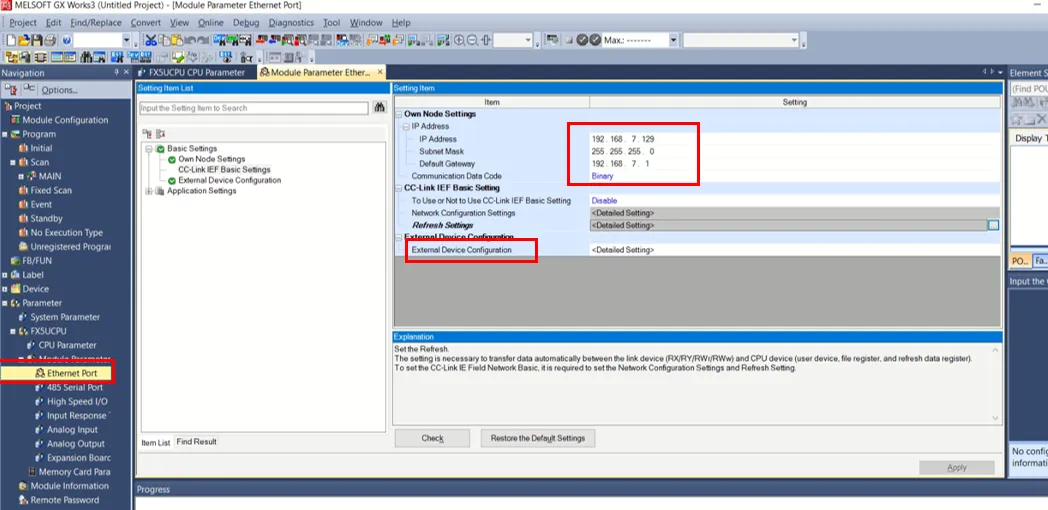 Ethernet Port
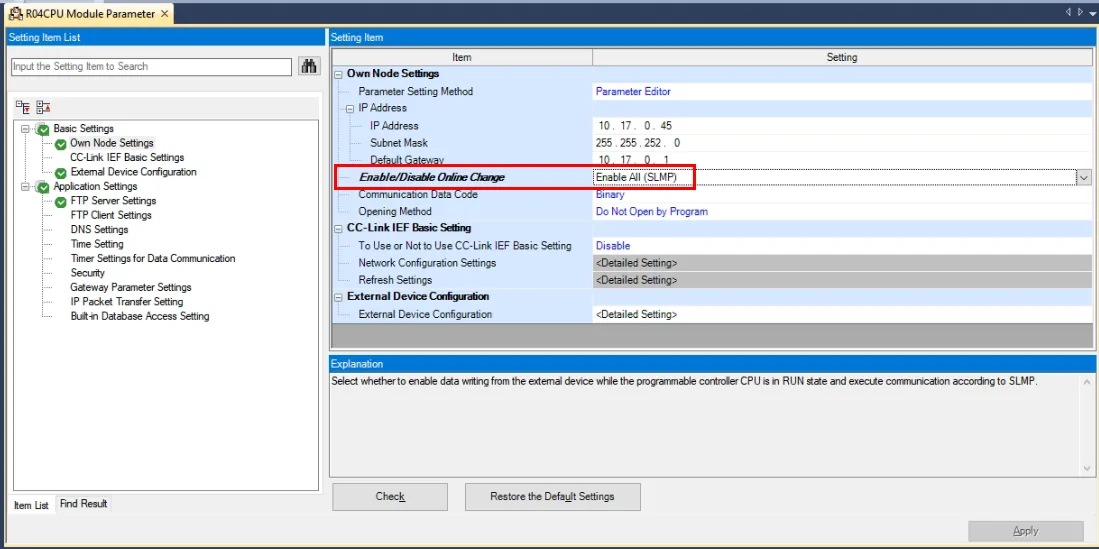
Some CPUs have an Enable/Disable Online Change setting. To allow the driver to write tag values to the PLC, this setting needs to be set to Enable All (SLMP).
- Double-click External Device Configuration.
View the available connections. If necessary, add more TCP connections to the SLMP Connection Module.
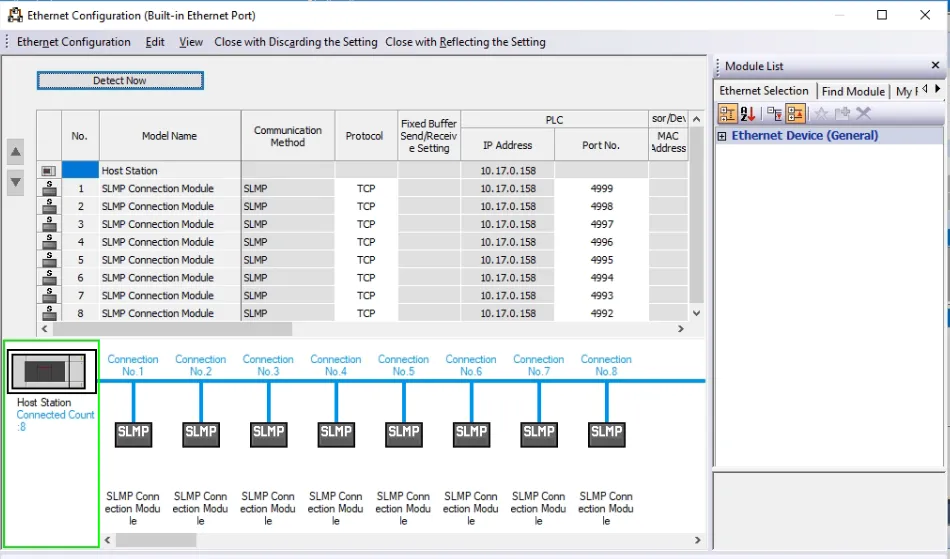
Note: If you modify any CPU or module parameters, you must power cycle the PLC after downloading the changes.
Step 2: Set up the PLC Device in Manufacturing Connect Edge DeviceHub
Configure the following parameters when you Connect a Device with this driver. Update default values to the specific setup of your device.
Parameter | Value |
|---|---|
Type | Mitsubishi |
Driver | Mitsubishi iQ-F Ethernet |
Network Address | The device address you defined in Step 1 |
Network Port PLC Port | 5002 |
Network ID Network No. of PLC | 0 |
Station ID Station No. of PLC | 1 |
Encoding Encoding Format | Select Ascii or Binary |
Read Timeout | 1000 (milliseconds) |
Retry Count The number of read retries | 0 |
Keep Alive TCP Keep-Alive | 60 (seconds) |
Step 3: Configure the List of Registers
When you Add Tags to the connected device, refer to the following register table and tag parameters.
Refer to the following additional resources:
Register Table
Name | Value Type | Address Format | Min Address | Max Address | Description |
|---|---|---|---|---|---|
LTC | bit | DDDD | 0 | 1023 | Long Timer Coil |
LTS | bit | DDDD | 0 | 1023 | Long Timer Contact |
LTN | dword, dint, string | DDDD | 0 | 1023 | Long Timer Current Value |
LSC | bit | DDDD | 0 | 1023 | Long Retentive Timer Coil |
LSS | bit | DDDD | 0 | 1023 | Long Retentive Timer Contact |
LSN | dword, dint, string | DDDD | 0 | 1023 | Long Retentive Timer Current Value |
LCC | bit | DDDD | 0 | 1023 | Long Counter Coil |
LCS | bit | DDDD | 0 | 1023 | Long Counter Contact |
LCN | dword, dint | DDDD | 0 | 1023 | Long Counter Current Value |
LZ | dword, dint | D | 0 | 1 | Long Index Register |
SM | bit | DDDD | 0 | 2047 | Special relay |
X | bit | DDDDD | 0 | 16383 | Input Relay |
Y | bit | DDDDD | 0 | 16383 | Output Relay |
M | bit | DDDDD | 0 | 61439 | Input Relay |
L | bit | DDDDD | 0 | 32767 | Latch Relay |
F | bit | DDDDD | 0 | 32767 | Annunciator |
V | bit | DDDDD | 0 | 32767 | Edge Relay |
B | bit | DDDDD | 0 | 61439 | Link Relay |
TS | bit | DDDDD | 0 | 25471 | Timer Contact |
TC | bit | DDDDD | 0 | 25471 | Timer Coil |
SS | bit | DDDDD | 0 | 25471 | Retentive Timer Contact |
SC | bit | DDDDD | 0 | 25471 | Retentive Timer Coil |
CS | bit | DDDDD | 0 | 25471 | Counter Contact |
CC | bit | DDDDD | 0 | 25471 | Counter Coil |
SB | bit | DDDDD | 0 | 32767 | Special Link Relay |
S | bit | DDDDD | 0 | 16383 | Step Relay |
SD | word, dword, int, dint, real, dreal | DDDD | 0 | 2047 | Special Register |
SD_string | string | DDDD | 0 | 2047 | Special Register |
SD_bit | bit | DDDDdd | 0 | 204715 | Special Register |
D | word, dword, int, dint, real, dreal | DDDDDDD | 0 | 4184063 | Data Register |
D_string | string | DDDDDDD | 0 | 4184063 | Data Register |
D_bit | bit | DDDDDDDdd | 0 | 418406315 | Data Register |
W | word, dword, int, dint, real, dreal | DDDDDDD | 0 | 4184063 | Link Register |
W_string | string | DDDDDDD | 0 | 4184063 | Link Register |
W_bit | bit | DDDDDDDdd | 0 | 418406315 | Link Register |
TN | word, dword, int, dint, string | DDDDD | 0 | 25471 | Timer Current Value |
SN | word, dword, int, dint, string | DDDDD | 0 | 25471 | Retentive Timer Current Value |
CN | word, dword, int, dint, real, dreal | DDDDD | 0 | 25471 | Counter Current Value |
CN_string | string | DDDDD | 0 | 25471 | Counter Current Value |
SW | word, dword, int, dint, real, dreal | DDDD | 0 | 2047 | Special Link Register |
SW_string | string | DDDD | 0 | 2047 | Special Link Register |
SW_bit | bit | DDDDdd | 0 | 204715 | Special Link Register |
Z | word, dword, int, dint, real, dreal | DD | 0 | 20 | Index Register |
Z_string | string | DD | 0 | 20 | Index Register |
R | word, dword, int, dint, real, dreal | DDDDD | 0 | 32767 | File Register |
R_string | string | DDDDD | 0 | 32767 | File Register |
R_bit | bit | DDDDDdd | 0 | 3276715 | File Register |
ZR | word, dword, int, dint, real, dreal | DDDDDDD | 0 | 4184063 | Serial Num File Register |
ZR_string | string | DDDDDDD | 0 | 4184063 | Serial Num File Register |
ZR_bit | bit | DDDDDDDdd | 0 | 418406315 | Serial Num File Register |
Tag Parameters
- Name: Select a register name from the drop-down list. The available options depend on the names in the register table.
- Value Type: Select a data type from the drop-down list. The available options depend on the register name selected.
- Polling Interval: Enter a value in seconds. This determines how often the tag should poll the register for data.
- Tag Name: Enter a name for the tag.
- Description (Optional): Enter a description for the tag.
- Address: Enter a tag address. The value must in the decimal format, within the allowed min/max range. Omit the leading zeros. The device might use the decimal (D), hexadecimal (H), or octal (O) address format. See the Register Table at the bottom of the dialog box. For Bit tags, append the bit address without the bit separator. The lowercase letters in the address format indicate how many digits you should enter in the Bit address.
- Count: Enter the number of register values to read. A count higher than 1 will generate an array of values from the address value configured and respective subsequent address values.
- Length: Available when you select the string value type. Enter the number of characters for tag values.
- Tag Formula: Enter a formula for the tag to process the generated data. Two variables are permitted: value (current tag value) and timestamp (current tag UNIX time in milliseconds). The following math functions are available:
- sin
- cos
- sqrt
- tan
- power: power(x) performs the operation 10^x.
- log: log(x) is the natural logarithm (the logarithm is in base e).
- exp: exp(x) performs the operation e^x.
- Only Publish on Change of Value: Select the checkbox to customize NATS messages to be published only when the value parameter changes from a previous value to a new one. Change of Value only applies to boolean, numeric (such as int or float), and simple string data types. It does not apply to complex types, such as JSON or array. Poll-once topics will not be affected by Change of Value settings. These topics will still only see a single message.
- Meta Data: Metadata summarizes basic information about data. This feature allows you to define key-value pair data for the device output payload later on. It can then be used to find, use, and reuse particular instances of data.
Note: If you use special characters in meta data key names, the special characters are replaced with underscore characters in the payload. This can cause two key names to be combined into one. For example, configuring the key names a**b and a&&b will cause only one key name to be created (a__b).