Establish an MCe-MC connection from Manufacturing Connect Edge
A Manufacturing Connect Edge (MCe)-Manufacturing Connect (ME) connection is a persistent, secure channel between Manufacturing Connect Edge and Manufacturing Connect. It enables centralized remote management of the gateway, including activation, credential provisioning, and forwarding of metrics and events to Manufacturing Connect.
The connection uses two ports for establishment: port 443/TCP for the initial activation handshake and port 51820/UDP for the permanent bi-directional remote access tunnel. An optional third port (8883/TCP) supports ongoing MQTT data transmission after the connection is in place.
Note: For details on the Manufacturing Connect port customization for this connection, see Establish an MCe-MC connection from Manufacturing Connect.
Core Components
Component | Role |
|---|---|
Manufacturing Connect Edge | The edge gateway. Initiates all connections outbound to Manufacturing Connect |
Manufacturing Connect | The centralized management platform. Receives and approves connections |
Port 443/TCP (HTTPS) | Initial activation channel |
Port 51820/UDP (Remote Access) | Permanent bidirectional management tunnel |
Port 8883/TCP (MQTT SSL) | Ongoing metrics and event data transmission (optional) |
Connection Sequence
The following steps describe how Manufacturing Connect Edge initiates and establishes its connection with Manufacturing Connect. From the Manufacturing Connect Edge side, the key actions are entering the activation URL and code (step 1) and confirming the permanent connection once it is established (step 7).
- Manufacturing Connect Edge user enters activation URL and activation code. See Step 2: Create an Activation Request in Manufacturing Connect Edge section of Activate an Edge Device for details.
- Manufacturing Connect Edge attempts to establish an initial connection with inbound port 443/TCP (HTTPS) of Manufacturing Connect.
- Manufacturing Connect receives the connection at its inbound port 443/TCP (HTTPS).
- Manufacturing Connect Edge sends an activation request that is received and approved by Manufacturing Connect. See Step 3: Approve the Activation Request in Manufacturing Connect section of Activate an Edge Device for details.
- Manufacturing Connect Edge sends activation requests on port 443/TCP of Manufacturing Connect.
- Manufacturing Connect user accepts the activation request in UI.
- Manufacturing Connect responds to the activation request with Litmus Remote credentials.
- Manufacturing Connect Edge attempts to establish a permanent connection with inbound port 51820/UDP (Remote Access) of Manufacturing Connect.
- Manufacturing Connect receives the connection at inbound port 51820/UDP (Remote Access).
- Manufacturing Connect Edge confirms the permanent connection with Manufacturing Connect.
- The permanent connection becomes a secure two-way (bi-directional) connection. Both Manufacturing Connect Edge and Manufacturing Connect use Manufacturing Connect's inbound port 51820/UDP (Remote Access) to communicate with each other.
Port Requirements: Manufacturing Connect Edge
Configure the following outbound ports on Manufacturing Connect Edge:
- Open outbound port 443/TCP to reach Manufacturing Connect (activation).
- Open outbound port 51820/UDP to reach Manufacturing Connect (permanent connection).
- Open outbound port 8883/TCP to reach Manufacturing Connect (MQTT data, if enabled).
Data Transmission: Default MQTT SSL Connector
After a Manufacturing Connect Edge-Manufacturing Connect connection has been established, Manufacturing Connect can receive Metrics or Events data (enable event forwarding is separately) from a Manufacturing Connect Edge instance. For Manufacturing Connect to receive the data, the Manufacturing Connect Edge instance must enable its Default Generic MQTT SSL Connector (Integration). Once the connector is enabled, the Manufacturing Connect Edge instance attempts to reach a connection at Manufacturing Connect's inbound port 8883/TCP.
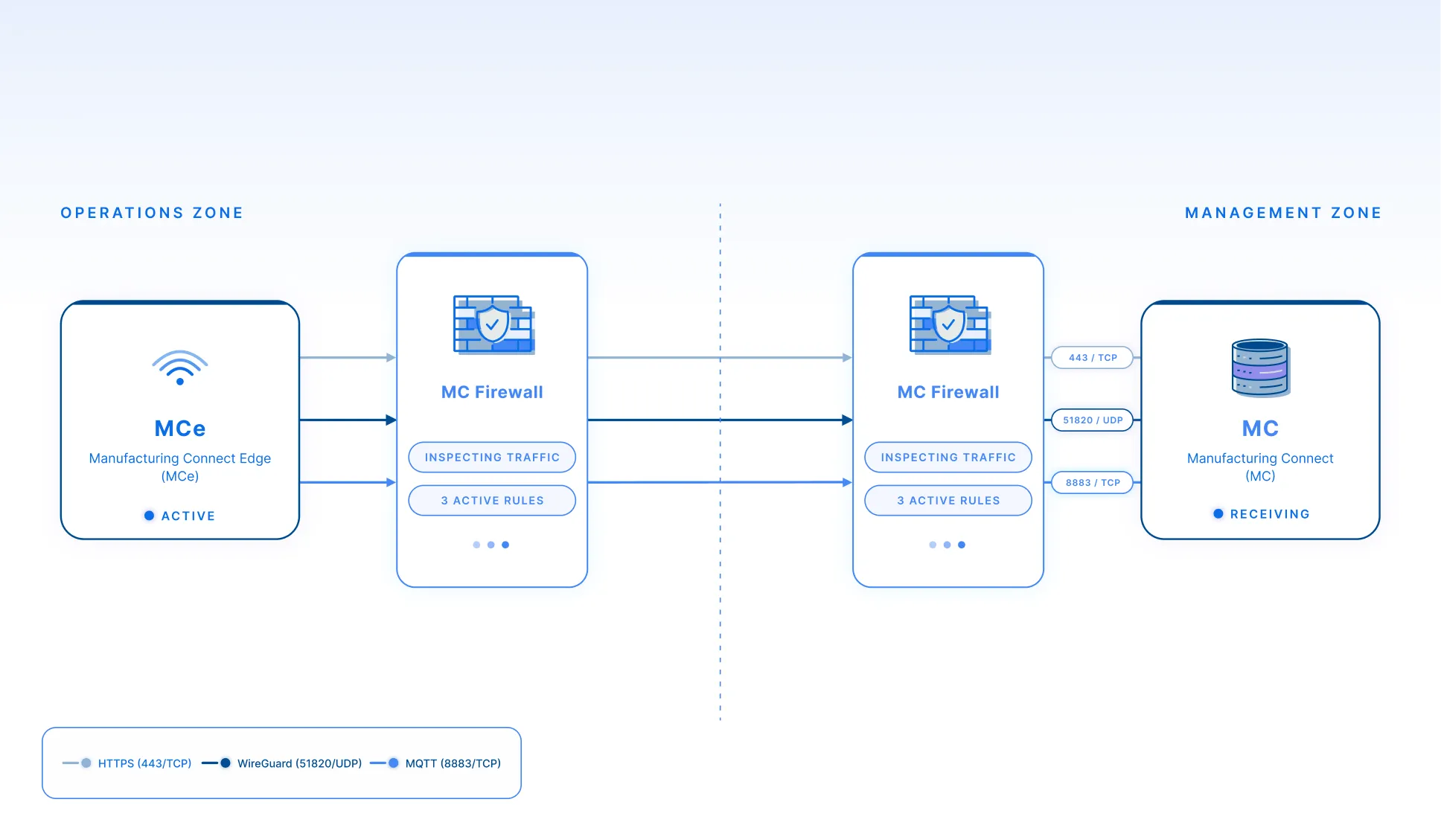
Note: Ports 443 and 51820 are required for establishing the initial connection. Port 8883 is used for ongoing data transmission once the connection is in place. For additional details about each port, see System Requirements.
Limitations and Considerations
- Ports 443 and 51820 must be reachable outbound before activation can begin. The connection cannot be established if either port is blocked.
- The MQTT data channel (port 8883) is independent from the management connection and must be explicitly enabled via the Default Generic MQTT SSL Connector.
- Manufacturing Connect Edge does not require any inbound ports for its management connection with Manufacturing Connect.
Related Topics
- Integration